
Your CSRs are the first point of contact for every customer who calls in. If they’re fumbling through ServiceTitan, clicking around trying to figure out how to book a job, the customer on the other end of that phone call can feel it. And it’s not a good look.
The reality is that most CSRs get a quick rundown when they’re hired, maybe shadow someone for a day or two, and then they’re thrown into the deep end. They figure out enough to get by, but “getting by” in ServiceTitan means they’re probably doing things the slow way, classifying calls wrong, and missing features that would make their lives easier.
Here’s what your CSRs actually need to know.
The Call Booking Screen
This is home base. Your CSRs are going to spend most of their day on this screen, so they need to know it cold.
The basics are pretty intuitive: find or create a customer, select a location, pick a job type, choose a business unit, and book the job. But there’s a lot of nuance in how you do each of those steps that can either speed things up or create problems downstream.
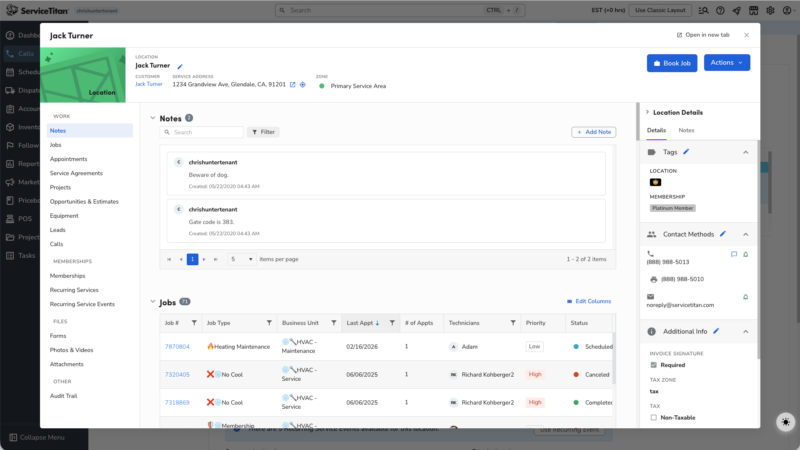
For example, when you click on a customer or location name on the booking screen, by default ServiceTitan opens this big popup modal that shows the full customer or location page. It takes up most of your screen and blocks what you’re trying to do. I’ve watched CSRs book hundreds of calls and roughly 90% of the time, they immediately click out of that popup without even looking at it.
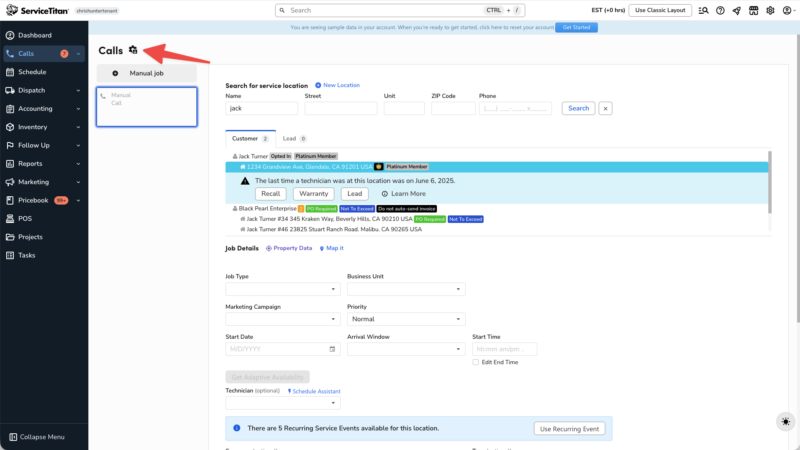
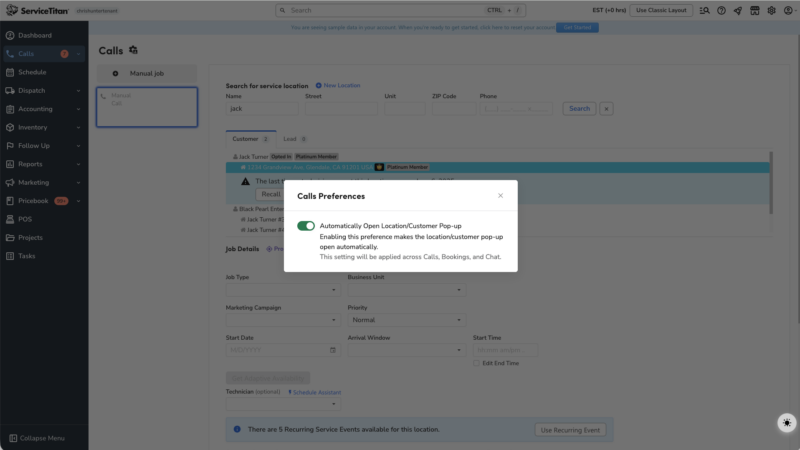
Here’s the fix: there’s a settings cog in the upper left corner of the call screen. Click it and toggle off “Automatically open the location/customer popup.” Now instead of that intrusive popup, you get little eyeball icons next to the customer and location names. Click the eyeball when you actually need to see the info. Leave it alone when you don’t. Small change, big time saver.
Call Classification and Why It Matters
Every call that comes in gets classified as either a lead or not a lead. This classification feeds directly into your marketing reports, your CSR scorecards, and your conversion tracking. If calls are classified wrong, your data is garbage. And if your data is garbage, you’re making business decisions based on lies.
Call classification is driven by two things: the call reason the CSR selects, and whether the call results in a booked job. Each call reason in your settings has an “isLead” flag. If the CSR picks a call reason marked as a lead and doesn’t book a job, that’s counted as a missed opportunity. If they pick one marked as not a lead, it doesn’t count against anyone.
Your CSRs need to understand this. They need to know which call reasons to use and when. A call from a vendor should get a “vendor call” reason (not a lead). A call from someone asking about pricing for a new system is absolutely a lead. A wrong number is not a lead. This sounds obvious, but I’ve seen shops where CSRs just pick whatever call reason is at the top of the list because nobody explained why it matters.
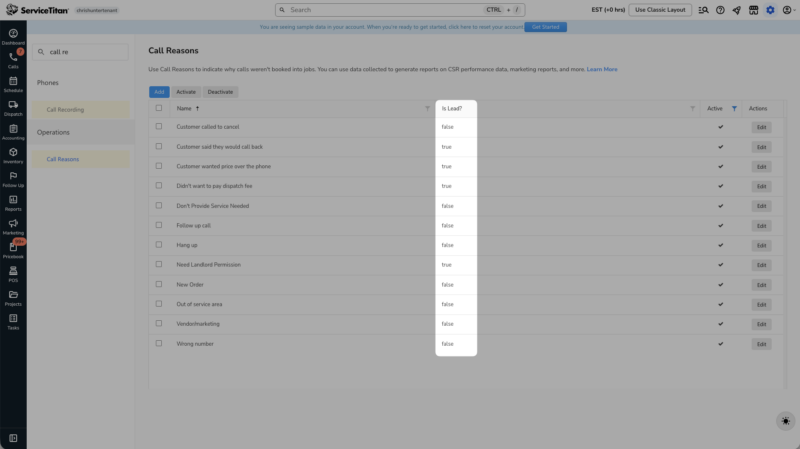
There’s also a feature where you can set specific phone numbers to automatically classify as “not lead.” The idea is that you’d give technicians and vendors a separate phone number to call in on, and those calls would skip the lead classification entirely. In my opinion, this feature isn’t quite working the way it should right now. It still asks the CSR for a call reason even though the classification is already set. So the call reason and the classification end up contradicting each other. I’d hold off on using this until it gets cleaned up. Just train your CSRs to pick the right call reasons instead.
Using Schedule Assistant or Adaptive Capacity
If your shop is just having CSRs eyeball the dispatch board and pick whatever time slot looks open, you’re doing it the hard way. ServiceTitan has tools that handle this automatically.
Schedule Assistant is the simpler option. When booking a job, the CSR can click the schedule assistant button and it’ll show available time slots based on technician shifts, existing appointments, and arrival windows. It’s a good starting point for most companies.
Adaptive Capacity Planning is the more advanced version. It does everything schedule assistant does but adds strategic rules on top. For example, you could set a rule that says “only offer maintenance appointments in the morning” so your afternoons stay open for emergency calls during summer. When the CSR clicks “Get Adaptive Availability,” they only see the time slots that fit your strategy. They don’t have to think about it.
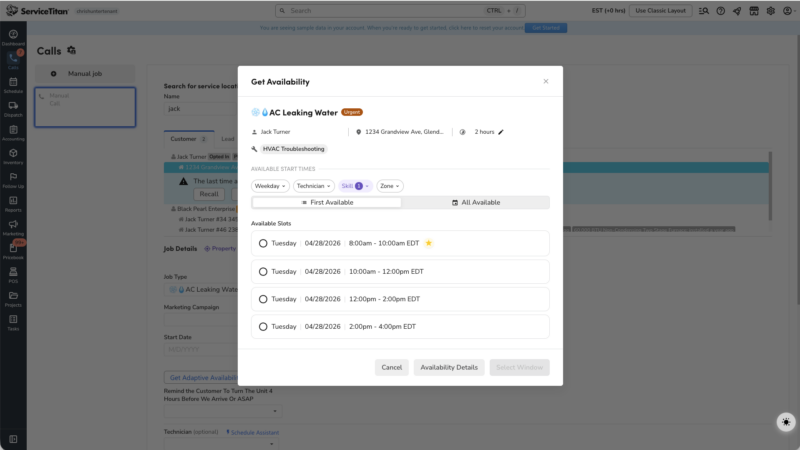
Now, adaptive capacity is more complex to set up on the backend. If you’re brand new to ServiceTitan, start with schedule assistant. Get comfortable with that first. But if you’ve been on the platform for a while and you’re ready to get more strategic about how you fill your board, adaptive capacity is worth the investment.
Either way, the CSR’s experience is similar. They click a button, they see available slots, they pick one. The difference is what’s happening behind the scenes.
When CSRs Should Build Estimates From the Call Screen
There’s a setting called “Create estimate from job booking” that adds a “Build Estimate” button to the call booking screen. Whether your CSRs should use this depends on what kind of company you are.
If you’re primarily residential, this feature lets your CSR build out an estimate over the phone. So if a customer calls and already knows exactly what they need, the CSR can put together the estimate, give them a price, and if the customer says yes, book the job with that estimate already attached. The technician shows up and the estimate is waiting for them.
But there’s a catch. For residential companies, you can’t sell the estimate from the call screen. You still have to book a job with a managed technician on it, and the estimate gets sold through the normal workflow. This is by design because of how ServiceTitan’s pricing model works around managed technicians.
If you’re a commercial or construction company with project tracking enabled, this works differently. You can actually sell estimates directly from the call screen without booking a job first. That’s because the business model for commercial work often involves selling over the phone without sending someone out to quote.
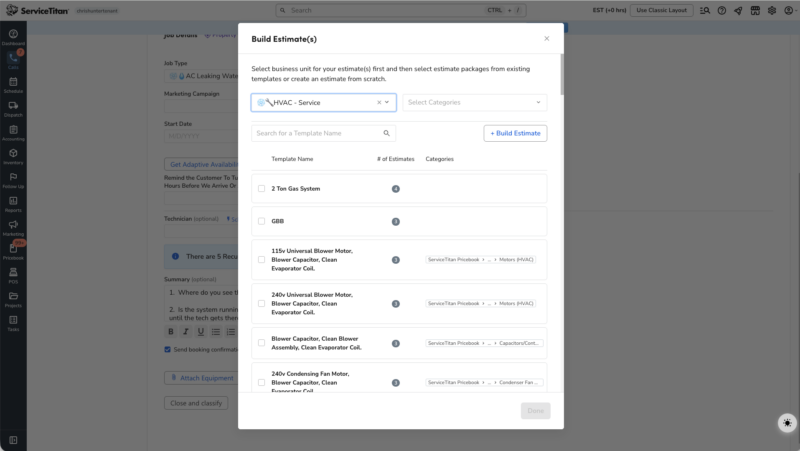
My recommendation: if you’re residential and your CSRs regularly give pricing over the phone, turn this on. It saves the technician from having to build the estimate from scratch. If your CSRs never give pricing over the phone, don’t bother. It just adds a button they’ll never use.
Handling Memberships and Customer Questions
CSRs get asked about memberships all the time. “What’s included?” “When is my next service?” “Can I cancel?” They need to know where to find this information quickly.
The customer and location pages in ServiceTitan show active memberships, upcoming recurring services, and billing history. Your CSRs should know how to find this information without fumbling around. They should also know the basics of how your membership program works (what’s included, how billing cycles work) even if they’re not the ones setting up memberships in the system.
The most common CSR mistake with memberships is not mentioning them at all. If a customer calls in for a repair and they’re a member, the CSR should know that and mention it. “I see you’re on our Gold membership, so your diagnostic fee is waived.” That kind of thing makes a huge difference in customer experience.
Common CSR Mistakes and How to Avoid Them
After watching a lot of CSRs work in ServiceTitan, here are the patterns I see:
Picking the wrong call reason. Either because they don’t understand the classification system or because they’re rushing through calls. The fix is training them on what each call reason means and why it matters for reporting.
Not using schedule assistant or capacity planning. They just look at the board and guess. This leads to double-bookings, overloaded technicians, and missed arrival windows. Turn on the scheduling tools and train your CSRs to use them every time.
Skipping location notes. If there’s a gate code, a mean dog, or a specific access requirement noted on the location, and the CSR doesn’t mention it to the tech, you’ve got a problem. Make checking location notes part of the booking workflow.
Not confirming customer contact info. Phone numbers and emails change. If the CSR doesn’t verify them on each call, you end up with bad data. Bad data means missed appointment confirmations, undeliverable invoices, and broken communication.
Booking jobs on the wrong business unit. If you run multiple business units (like service and install), a job booked to the wrong one throws off your dispatch board, your reporting, and your capacity planning. CSRs should know which business unit to select and why.
Frequently Asked Questions
How long does it take to train a new CSR on ServiceTitan?
Plan for about one to two weeks to get them functional on the basics (booking calls, navigating the customer page, using schedule assistant). Full proficiency where they’re comfortable with memberships, estimate building, and handling edge cases usually takes one to two months of real call experience.
Should CSRs have access to the dispatch board?
It depends on your workflow. If your CSRs also dispatch, yes. If you have dedicated dispatchers, then CSRs probably don’t need full dispatch board access. They just need schedule assistant or adaptive capacity from the call booking screen. Giving them both can create confusion about who’s managing the board.
What ServiceTitan permissions should CSRs have?
Keep it tight. CSRs need call booking, customer and location page access, and whatever scheduling tools you’re using. They typically don’t need access to invoicing, payroll, or reporting. The fewer things they can accidentally break, the better.
Can CSRs see call recordings in ServiceTitan?
Yes, if call recording is enabled and they have the right permissions. This can be a useful training tool. Pull up a call recording, listen to it together, and walk through what the CSR did well and what they could improve.
What’s the best way to train CSRs who aren’t tech-savvy?
Use the Practice Environment. Let them book fake jobs, create fake customers, and click around without any risk to your real data. Pair that with sitting next to an experienced CSR for their first week. Watching someone else do it in real time is still one of the best ways to learn.
Your CSRs can either be a bottleneck or a competitive advantage. It comes down to how well they know the tools. Invest in training them properly on ServiceTitan and you’ll see it in your booking rates, your data quality, and your customer reviews.
For a full walkthrough of every call booking feature and setting, check out Blue Collar Nerd’s Ultimate ServiceTitan Guide. The call booking module alone covers over a dozen videos worth of material, all broken down step by step.